
Free conversion audit
Get a tailored action plan based on your current funnel.
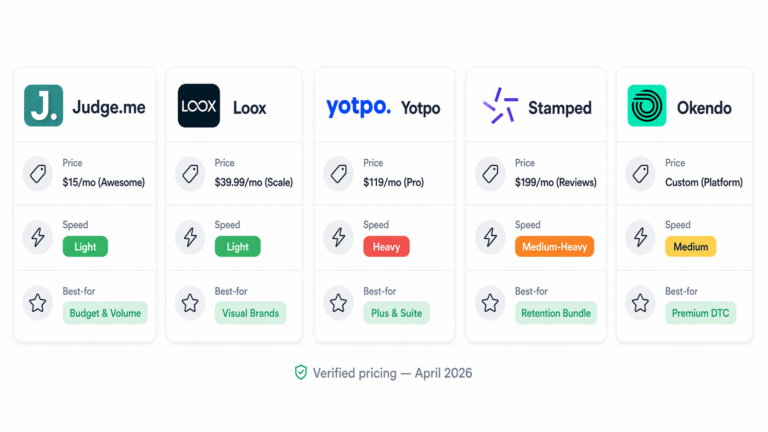
Okendo vs Judge.me looks like a simple $119-versus-$15 decision until you compare the plans your store can actually use. At 1,200 monthly orders on month-to-month billing, Okendo Growth costs $119 per month while Judge.me Awesome costs $15. That is a $104 monthly difference, but price alone does not tell you which review system fits your catalog, marketing stack, or migration risk.
Judge.me focuses on broad access: its Free plan includes unlimited product, store, photo, and video reviews, while Awesome unlocks its paid integrations, AI features, and customization for one flat fee. Okendo prices by monthly order volume and offers a broader customer-marketing platform spanning reviews, loyalty, quizzes, referrals, and surveys.
This comparison uses official vendor pricing, Shopify listings, and help documentation checked on September 2, 2026. It covers plan limits, Google programs, migration risks, and the conditions favoring each app. For a wider shortlist, see our best Shopify reviews app guide.
Okendo vs Judge.me: The Quick Answer
Judge.me is the value choice for most cost-conscious Shopify stores. Its Free plan removes review-volume anxiety, and its $15-per-month Awesome plan provides AI tools, Google Shopping features, social sharing, referrals, integrations, and deeper widget control without an order-based price ladder.
Okendo is the stronger fit when reviews must operate inside a broader customer-marketing system. Its order-volume plans support customer attributes, cross-product workflows, and higher-tier onboarding and reporting. That depth matters when reviews support segmentation, loyalty, quizzes, surveys, and lifecycle marketing.
| Decision factor | Okendo | Judge.me |
|---|---|---|
| Pricing model | Monthly order bands | Free or flat $15 monthly |
| Free-plan review volume | Up to 50 monthly orders | Unlimited reviews |
| Broader platform | Reviews, loyalty, quizzes, referrals, surveys | Reviews with referral and coupon tools |
| Best default fit | Brands needing connected customer-marketing workflows | Stores prioritizing predictable cost and core review coverage |
Okendo vs Judge.me Pricing: What Each Plan Costs in 2026
Okendo’s published Shopify pricing is based on monthly order volume. Judge.me prices by feature tier and states that review volume does not increase the bill. That structural difference becomes more important than the entry price as your order count grows.
| App and plan | Monthly price | Published limit or scope |
|---|---|---|
| Okendo Free | $0 | Up to 50 orders per month |
| Okendo Essential | $19 | Up to 200 orders per month |
| Okendo Growth | $119 | Up to 1,500 orders per month |
| Okendo Power | $299 | Up to 3,500 orders per month |
| Judge.me Free | $0 | Unlimited reviews |
| Judge.me Awesome | $15 | Unlimited reviews and paid feature set |
Okendo also lists annual billing of $204 for Essential, $1,308 for Growth, and $3,288 for Power. Its separate platform pricing page explains that order-volume top-ups, upgrades, add-ons, and custom Scale pricing may apply. Judge.me’s official pricing page says Awesome is $15 per month; its help center states there is no annual plan or annual discount.
Compare required features, monthly orders, and add-ons—not plan names. Date your decision because pricing and feature gates can change.

Review Collection: How Okendo and Judge.me Gather Customer Proof
Both apps cover the essential workflow: request a review after purchase, collect written and visual feedback, moderate the submission, and display it on the relevant product page. Both also collect store-level feedback, so this is not a choice between having a review workflow and having none.
Okendo’s Free listing includes automated review requests, its Smart Review Form, rewards, displays, grouping, and moderation. Its forms can collect structured customer attributes alongside the rating and review, which is useful when shoppers care about fit, skin type, experience level, use case, or another category-specific detail.
Judge.me’s Free plan includes unlimited product and store reviews plus photo and video reviews. Its paid plan adds coupons and referrals without moving to an order-priced tier. The FTC’s Consumer Reviews and Testimonials Rule guidance says incentives cannot be conditioned on a particular sentiment and warns that failing to disclose an incentive could violate the FTC Act.
Ask which fields help your next shopper, which languages you need, and which consent and incentive rules your team can operate consistently.

Review Widgets: Which Shopify App Gives You More Control?
A review app earns its place through useful proof, not a long feature list. Check the star summary, photo and video visibility, filtering, mobile readability, keyboard access, and how quickly shoppers can understand recurring themes.
Okendo includes on-site displays and review grouping on Free, then adds AI summaries and keywords on Growth. Power adds advanced CSS customization. Judge.me includes review widgets and rich snippets on Free; its Shopify listing says Awesome includes 16 widgets and full customization. The correct tier therefore depends on whether your design needs basic brand settings or controlled component-level styling.
Evaluate the widget inside your actual theme before publishing. A dense review block can push the purchase controls down the page, while an over-compressed block can hide the detail that makes social proof credible. Use the review section as part of your broader Shopify product page optimization, not as an isolated app installation.

Photo, Video, and AI Review Features: What You Actually Get
Both platforms support photo and video reviews. Compare the required plan, the tools used to summarize that content, and how the data connects to your stack.
Okendo Growth lists AI-powered review summaries and keyword insights, along with questions and answers and TikTok Shop capabilities. Judge.me Awesome lists AI summaries, AI replies, and AI translation. These are different jobs: summaries help shoppers scan repeated themes, replies reduce the blank-page work of responding, and translation helps a multilingual catalog reuse feedback across markets.
Do not treat an AI summary as a replacement for the underlying reviews. Keep source reviews visible, verify that negative themes are represented, and review generated replies before publication. Your team remains responsible for accuracy, tone, and any regulated product claims repeated in customer content.
Shopify Review App Integrations: Klaviyo, Gorgias, and More
Okendo’s official integration library documents connections across Klaviyo, Attentive, AfterShip, Google, TikTok, Meta, Bazaarvoice, Gorgias, Zendesk, Postscript, Omnisend, loyalty tools, Recharge, Tapcart, and Shopify POS. Availability can depend on the Okendo product, plan, or add-on, so a catalog entry is not proof that your selected tier includes it.
Judge.me advertises more than 130 integrations on its Shopify App Store listing, including Klaviyo and Gorgias. Its pricing page places all integrations on Awesome. That makes the $15 plan easy to budget, but you should still inspect the exact events and fields exchanged by each connection.
Build a five-line integration contract before choosing:
- Which review-request and review-submitted events reach your email platform?
- Which customer attributes can become segmentation properties?
- Can support agents view and act on review context without switching tools?
- Which subscription, loyalty, and referral actions are native versus automated through a third party?
- Which features require a higher plan or separate add-on?
Google Reviews: Rich Snippets, Product Ratings, and Seller Ratings
These three Google surfaces are not interchangeable, and installing either app does not guarantee stars anywhere.
- Organic review snippets use structured data such as
ReviewandAggregateRatingon eligible pages. Google’s review-snippet documentation says valid markup can make a page eligible for stars and summary information, but display is not guaranteed. - Google Shopping Product Ratings concern reviews of specific products in ads and free listings. Google requires at least 50 reviews across the submitted feed, monthly updates, policy compliance, and strong product matching through identifiers such as
GTINor brand plusMPN. See Google’s Product Ratings eligibility rules. - Store or Seller Ratings summarize the shopping experience with the merchant, not one SKU. Google may use Google Customer Reviews, supported review partners, and its own shopping research. Okendo appears in Google’s supported store-rating partner list.
Okendo’s Google Seller Ratings FAQ says the program is included with Enterprise or available as a $99-per-month add-on on other plans, and that imported site reviews cannot be submitted to Google through that program. Judge.me Awesome includes Google Shopping features, but that statement should not be rewritten as automatic eligibility for merchant-level Seller Ratings.
Okendo vs Judge.me Migration: What Transfers and What Does Not
Review migration is a field-mapping project, not a one-click guarantee. Preserve the original export and test text, media, replies, attributes, verification, incentives, and moderation states.
For Judge.me-to-Okendo moves, Okendo’s import documentation, updated June 22, 2026, says it can auto-detect Judge.me exports. Its template accepts image and video URLs, replies, attributes, status, and a verified-buyer field. Media must be reachable at public URLs during import.
For Okendo-to-Judge.me moves, Judge.me’s migration guide, published May 22, 2026, documents sharper limits: imported reviews are not marked Verified under Judge.me’s standards, they cannot enter Judge.me’s Google Shopping Product Ratings feed, unverified reviews have TikTok syndication restrictions, and videos require manual upload.
Judge.me’s July 29, 2026 export guide also says CSV exports omit videos, phone numbers, SKU, order details, verified status, and review tags, with a limit of 100,000 reviews per file. Plan for reversibility before choosing either platform, not on the day you leave it.

Judge.me vs Okendo Cost Example at 1,200 Monthly Orders
Consider an illustrative Shopify apparel store processing 1,200 orders per month. That volume fits within Okendo Growth’s published 1,500-order limit, so the listed cost is $119 on month-to-month billing. Judge.me Awesome remains $15 because its price does not scale with review or order volume.
The difference is $104 per month or $1,248 per year. That does not prove Judge.me produces the better business result. It establishes the hurdle Okendo must clear: the store should identify at least $1,248 in annual value from the Okendo-specific workflows, data, integrations, or operational fit it will actually use.
If the team needs structured fit attributes connected to Klaviyo segments, plans to combine reviews with other Okendo products, and has an owner for those workflows, Growth may be rational. If the requirement is reliable review collection, visual proof, customizable widgets, AI assistance, and common integrations, Judge.me Awesome leaves more budget for creative, testing, or merchandising.
Which Shopify Stores Should Choose Okendo or Judge.me?
Choose Judge.me when predictable value is the priority
- You want unlimited reviews without an order-based price ladder.
- You need photo and video reviews on a free plan.
- You want AI, integrations, Google Shopping tools, referrals, and customization for a flat $15 monthly fee.
- You do not need a broader reviews, loyalty, quiz, referral, and survey suite from one vendor.
Choose Okendo when reviews are part of a connected customer platform
- You will use structured customer attributes in segmentation and merchandising.
- You want reviews connected with Okendo Loyalty, Quizzes, Referrals, or Surveys.
- You need a documented Okendo integration or workflow and have verified that your selected plan includes it.
- Your order volume and required add-ons fit the budget, or you need Power-level reporting and managed onboarding.
The condition-based verdict is straightforward: Judge.me wins on transparent, low-cost review coverage; Okendo wins when its connected platform depth is a real operational requirement. A large store can still choose Judge.me, and a smaller store can still justify Okendo. Store size is a constraint, not the decision by itself.
How to Test a Shopify Reviews App Before You Switch
Do not migrate the full archive first. Run a controlled evaluation on an unpublished duplicate theme and use the same representative products for both apps.
- Define the job. Write down the required review types, attributes, languages, integrations, Google programs, and moderation permissions.
- Calculate the twelve-month cost. Include order growth, annual billing, add-ons, implementation work, and the staff time needed to operate each workflow.
- Import a difficult sample. Include videos, images, old replies, variant references, incentives, hidden reviews, and verified purchases.
- Inspect the product page. Test desktop and mobile placement, filters, gallery behavior, accessibility, and the path back to the purchase controls.
- Validate Google separately. Test structured data, confirm Merchant Center program status, and do not assume imported verification follows the CSV.
- Measure performance before and after. Run the same templates through our website speed test and compare requests, script weight,
LCP,INP, andCLS. Do not declare either app faster from a demo store. - Verify every integration event. Use test profiles and orders to confirm fields arrive in Klaviyo, Gorgias, or your other required systems.
Keep the source active until totals, media, storefront display, requests, and Google feeds pass review. Schedule the cutover with an owner and rollback point.
Get a Free Shopify Reviews App Audit
Your review app should make buying easier without creating unnecessary cost, migration lock-in, or product-page clutter. Site OptimizR will review your current widgets, collection flow, integrations, Google setup, mobile experience, and performance impact, then give you a prioritized action plan.
Book your free Shopify reviews audit before you upgrade or migrate. You will leave with a clear recommendation based on your order volume, stack, and conversion goals—not a generic app ranking.
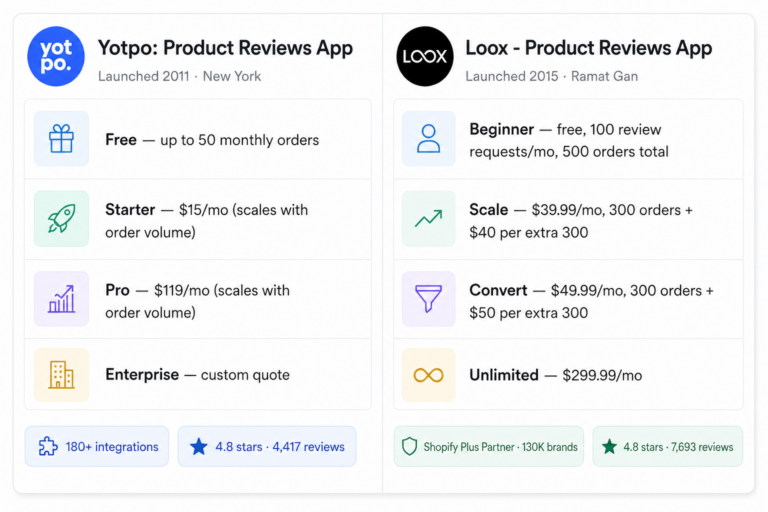
If Yotpo and Loox are also on your shortlist, compare them directly in our Yotpo vs Loox guide.