Free conversion audit
Get a tailored action plan based on your current funnel.
Your WooCommerce Cart Abandonment Rate Is Costing You More Than You Think
A high WooCommerce cart abandonment rate means customers with genuine buying intent are leaving your store before they pay. They found your product, liked it enough to add it to cart, and then something between that moment and the order confirmation page made them stop.
The average documented cart abandonment rate across ecommerce is 70.19% according to Baymard Institute. WooCommerce stores often trend higher because the default cart and checkout experience is built for developer flexibility, not buyer conversion.
This post covers the 10 highest-impact fixes for reducing WooCommerce cart abandonment. If your store gets traffic and add-to-cart activity but completed orders trail behind, the revenue is not missing. It is leaking through friction you can identify and fix.
What Counts as a High WooCommerce Cart Abandonment Rate?
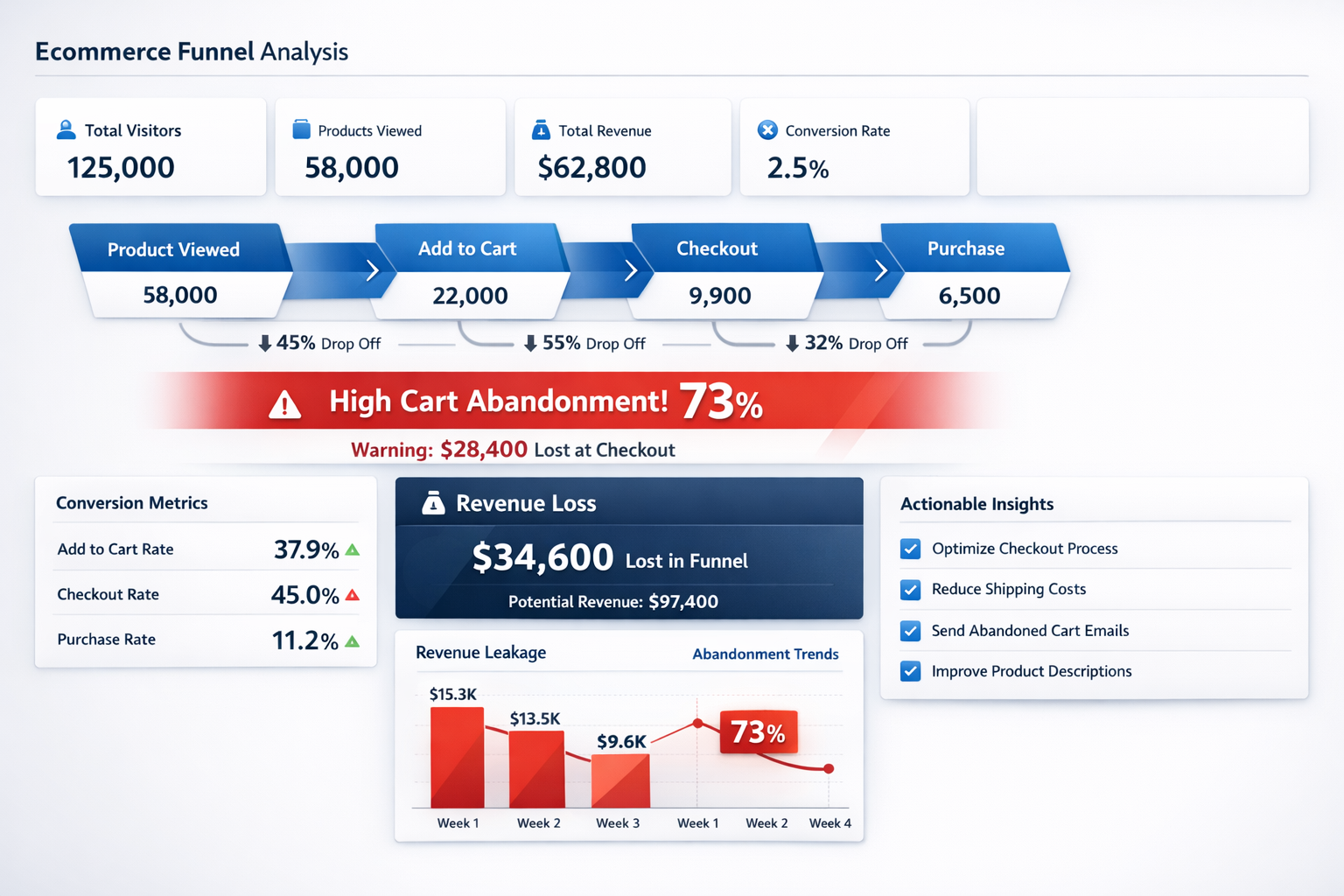
WooCommerce cart abandonment rate is the percentage of shoppers who add items to their cart but never complete the purchase. For most WooCommerce stores, anything consistently above 70% signals friction worth investigating. Above 75%, the problem is almost certainly structural.
Some abandonment is always expected. Shoppers comparison-shop, save items for later, or get interrupted. That is normal behavior. But when a store has strong add-to-cart rates and weak completed purchases week after week, the issue is almost always friction, not demand.
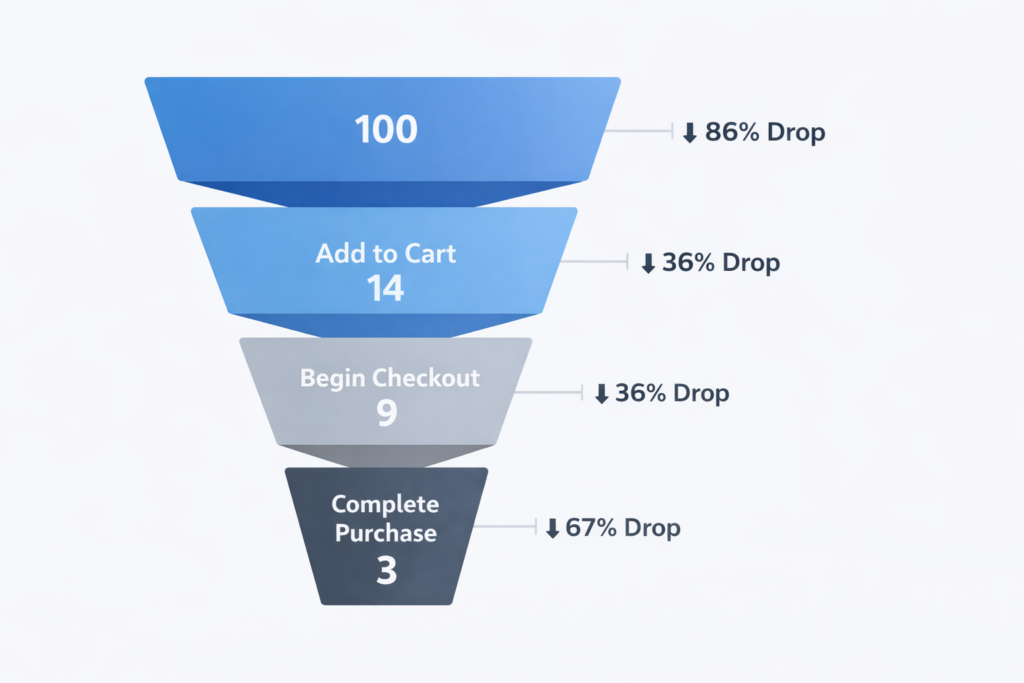
WooCommerce stores face a specific disadvantage here. Unlike hosted platforms that control the full checkout experience, WooCommerce hands store owners an open-ended system. That freedom is powerful but also means the default cart page, checkout layout, and payment flow often ship with conversion gaps that no plugin fills automatically.
Why WooCommerce Stores Lose More Carts Than They Should
Cart abandonment on WooCommerce rarely stems from one cause. It builds from a stack of small problems: a confusing cart layout, a slow page load from plugin bloat, surprise shipping fees revealed too late, missing payment options, and a checkout that feels unnecessarily long.
WooCommerce compounds this because the default experience relies heavily on whatever theme you installed and however many plugins you layered on top. Two WooCommerce stores selling identical products can have completely different abandonment rates based purely on how the cart-to-checkout path is configured.
The core issues behind WooCommerce cart abandonment are predictable: unexpected costs, forced account creation, slow load times, limited payment methods, weak trust signals, and a checkout with too many fields. Fixing the right combination of these factors is how stores move from losing 75% of their carts to losing 55% or less.
Fix #1: Fix the Default WooCommerce Cart Page Layout
The default WooCommerce cart page is a table. It looks like a spreadsheet. On mobile it is even worse: columns get crushed, buttons shrink, and the checkout CTA gets buried below update and coupon fields that distract from the goal.
The cart page has one job: move the buyer to checkout. Everything on that page either supports that action or works against it.
Practical improvements that reduce WooCommerce cart abandonment:
- Replace the default table layout with a cleaner card-style design on mobile
- Make the Proceed to Checkout button large, high-contrast, and visible without scrolling
- Show a shipping threshold message like “You’re $12 away from free shipping” directly on the cart page
- Move the coupon code field below the fold or collapse it — visible coupon boxes trigger coupon-searching behavior
- Add a concise return policy line or trust badge near the checkout action
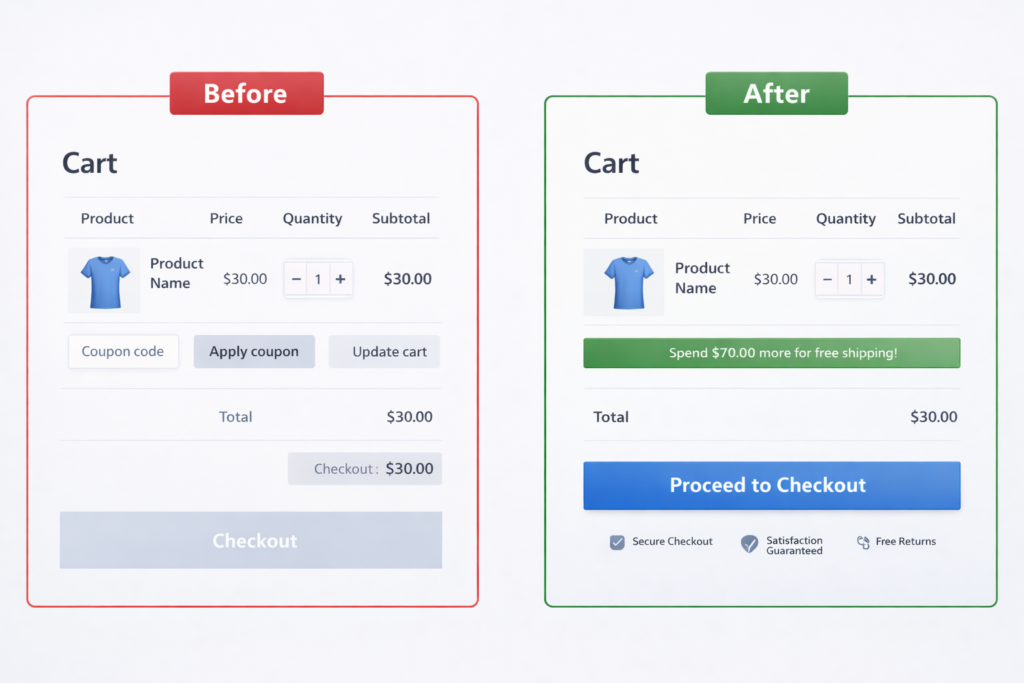
If your theme does not give you control over the cart layout, a lightweight cart template override or a plugin like FunnelKit or CartFlows can replace the default entirely. The critical measure is whether the checkout CTA is the most obvious next step on every screen size.
Fix #2: Remove Surprise Shipping Costs
Unexpected costs are the number one reason shoppers abandon carts, and WooCommerce stores are especially vulnerable because shipping logic is often configured loosely or left on defaults that hide the total until late in checkout.
If a buyer adds a product at $39 and then discovers $8.50 shipping at the checkout step, trust erodes immediately. Even if the total is still reasonable, the feeling of being surprised makes the shopper re-evaluate the entire purchase.
Fix this by making cost transparent early:
- Display free shipping thresholds on product pages and in the cart
- Use a progress bar showing how close the cart is to free shipping
- If free shipping is not viable, state flat-rate shipping on the product page so there are zero surprises
- For international stores, be explicit about duties and taxes before checkout
Transparency beats generosity. A clear $5.99 flat-rate fee shown on the product page converts better than a “free shipping” threshold that the customer only discovers at the last second.
Fix #3: Eliminate Plugin Bloat That Slows the Cart
WooCommerce runs on WordPress, and WordPress runs on plugins. Most WooCommerce stores have 15 to 30 active plugins. The problem is that many of those plugins inject scripts, stylesheets, and database queries on every page load, including the cart and checkout.
Page speed directly impacts abandonment. Google has documented that 53% of mobile users leave pages that take longer than 3 seconds to load. If your cart page loads in 4 or 5 seconds because of bloated scripts, you are losing buyers before they even see the checkout button.
The fastest wins are usually subtractive:
- Audit your active plugins and deactivate anything that is not essential to cart, checkout, or fulfillment
- Use a plugin like Asset CleanUp or Perfmatters to prevent non-essential scripts from loading on cart and checkout pages
- Move analytics and marketing scripts to load asynchronously or via Google Tag Manager
- Check your website speed score on both mobile and desktop for the cart URL specifically
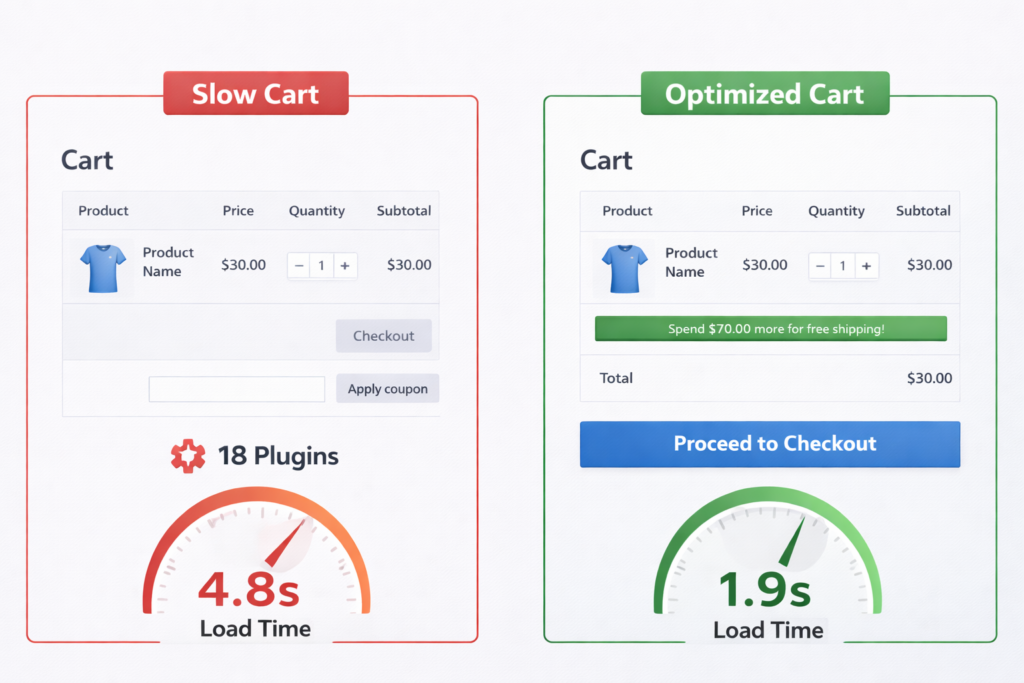
The default WooCommerce cart page should load in under 2.5 seconds on mobile. If yours is slower, every extra second costs you completions.
Fix #4: Simplify the WooCommerce Checkout to the Minimum
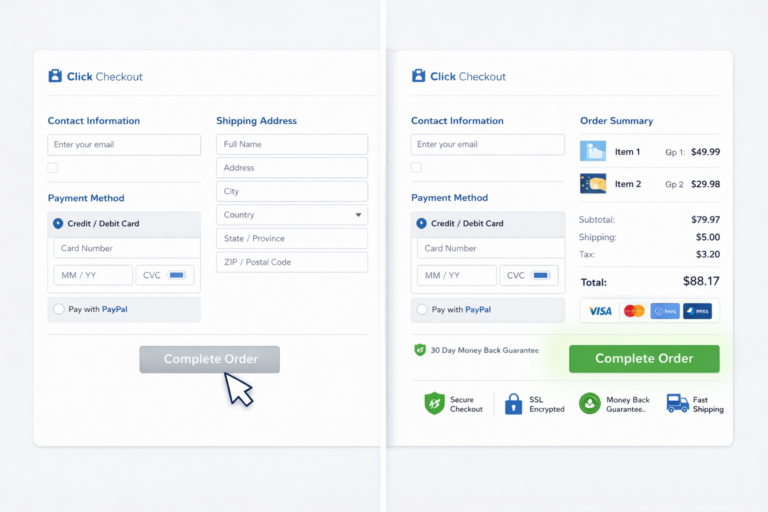
The default WooCommerce checkout has more fields than most buyers want to fill. Company name, order notes, a second address line, phone number — each one creates a micro-decision that slows down completion.
Baymard’s research shows that 18% of shoppers abandon because the checkout process was too long or complicated. On WooCommerce, where the checkout template is fully editable, stores frequently add fields without measuring the cost.
A lean WooCommerce checkout should include only what is needed to fulfill the order:
- Remove the Company Name field unless you sell B2B
- Remove Order Notes unless operationally necessary
- Make Address Line 2 optional or collapsed
- Use address autocomplete to reduce typing
- Remove the phone field if your shipping carrier does not require it
If you are on WooCommerce 8.3 or later, the new WooCommerce Blocks checkout is faster and cleaner than the classic shortcode checkout. Migrating to it is one of the simplest ways to cut field count and improve mobile UX without any custom code.
Fix #5: Make Guest Checkout Easy and Default
Forcing account creation before purchase is one of the fastest ways to increase WooCommerce checkout drop off. Baymard found that 26% of shoppers abandon because the site wanted them to create an account.
WooCommerce has a setting for this under WooCommerce → Settings → Accounts & Privacy. Enable Allow customers to place orders without an account. This should be active on every store unless you have a specific membership or subscription model that requires pre-purchase login.
If you want to build customer accounts for retention and marketing, the right time to ask is after the purchase. On the thank-you page or in the order confirmation email, invite the buyer to save their details. At that point the trust is earned and the friction is low.
Accounts should serve the customer, not gate the sale.
Fix #6: Add the Payment Methods Your Buyers Expect
Missing payment options cause abandonment that is invisible in analytics. The shopper simply leaves when they do not see their preferred way to pay. There is no error message. No rage click. Just a quiet exit.
The default WooCommerce payment setup often starts with just Stripe or PayPal. Depending on your market, that might cover 70% of buyers but miss the rest entirely.
For most WooCommerce stores, the right payment stack includes:
- Major credit and debit cards via Stripe or WooCommerce Payments
- PayPal — still preferred by a large segment of buyers, especially for higher-priced items
- Apple Pay and Google Pay — reduces mobile checkout to a single tap
- Buy Now Pay Later options like Klarna, Afterpay, or Affirm for stores with AOV above $75
Express payment buttons should appear on both the cart page and the checkout page. The fewer steps between intent and payment confirmation, the fewer carts you lose. This is one of the areas where Shopify stores often have an edge by default, but WooCommerce can match it with the right configuration.
Fix #7: Place Trust Signals Where Hesitation Happens
Buyers hesitate at two moments: when they see the cart total and when they enter payment details. Those are the two places where trust signals have the most impact on reducing WooCommerce cart abandonment.
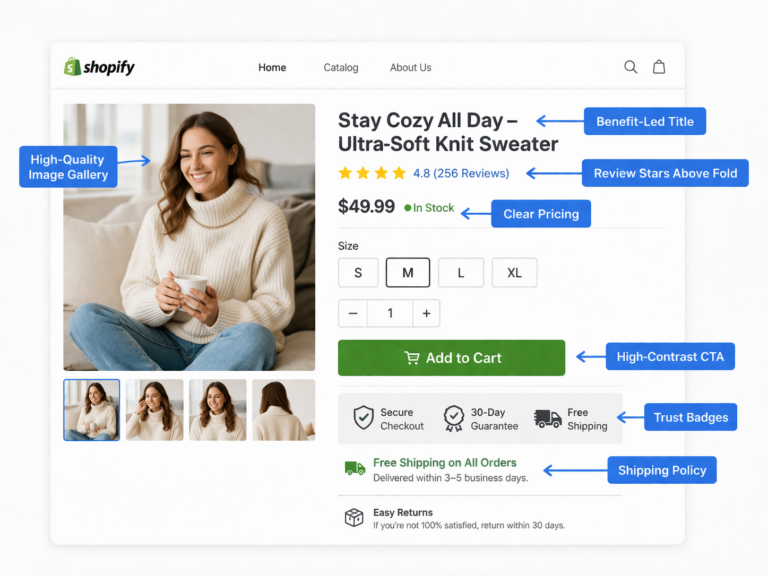
A trust badge buried in the footer helps no one. The same badge placed next to the checkout button can save a sale. Placement matters more than the signal itself.
Effective trust signals for WooCommerce cart and checkout pages:
- A one-line return policy near the Proceed to Checkout button (“30-Day Free Returns — No Questions”)
- Security icons and SSL reassurance near the payment form
- Payment method logos (Visa, Mastercard, PayPal, Apple Pay) displayed visually
- Delivery estimate in plain language (“Arrives in 3–5 business days”)
- Review count or rating visible on the cart page, not just the product page
If your store has a satisfaction guarantee, a warranty, or a strong review count, the cart and checkout pages are where those facts earn their weight. Buyers who already selected a product need reassurance, not persuasion.
Fix #8: Optimize the Mobile Cart Experience First
Most WooCommerce stores get 60% to 75% of traffic from mobile devices, but mobile conversion rates are typically half of desktop. That gap is almost entirely caused by friction in the mobile cart and checkout experience.
The default WooCommerce cart on mobile is a compressed version of the desktop table. Buttons are small. The quantity selector is tiny. The checkout CTA competes with coupon fields and cart update buttons for screen space. On most themes, the experience was designed for desktop and then responsively squeezed.
Mobile cart fixes that directly reduce abandonment:
- Make the checkout button full-width and sticky on mobile so it stays visible during scrolling
- Use Apple Pay and Google Pay buttons prominently — one-tap payment eliminates form friction entirely
- Reduce cart page content to essentials: product image, name, price, quantity, and CTA
- Test your cart on a real phone, not browser DevTools — tap targets, scroll behavior, and speed feel different on actual hardware
- Check page speed on mobile for the cart and checkout URLs specifically — they are often slower than product pages due to heavier script loads
Mobile CRO is subtractive. Every element that does not push the buyer toward checkout is friction. Remove it or move it below the fold.
Fix #9: Set Up Automated WooCommerce Cart Recovery
Unlike Shopify, WooCommerce does not include built-in abandoned cart recovery. You need a plugin or an external email platform to capture abandoned carts and trigger follow-up sequences. Without this, every abandoned cart is a dead end.
Recovery emails work because many cart abandonments are caused by interruption, not rejection. The shopper got a text, switched tabs, or ran out of time. A well-timed reminder brings them back when they are ready.
A proven WooCommerce cart recovery sequence:
- Email 1 at 1 hour — Simple reminder with the cart contents, a direct link back to the cart, and no discount
- Email 2 at 24 hours — Reinforce product benefits, address a common objection (shipping speed, returns), and include a customer review or social proof element
- Email 3 at 48–72 hours — Final reminder with a small incentive if margins allow (free shipping, 10% off), positioned as expiring
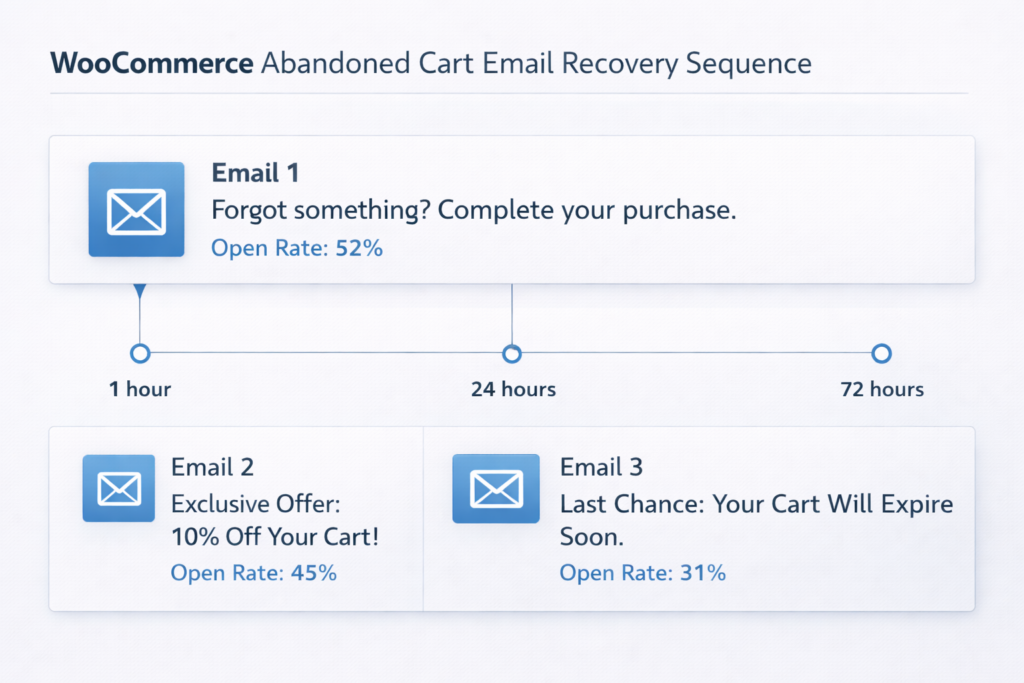
Plugins like AutomateWoo, FunnelKit Automations, or Klaviyo can handle this. The key is that the recovery link takes the buyer back to their exact cart, not a generic homepage. And the emails should be concise — a product image, the price, and a single CTA button. No newsletters. No cross-sells in the first email.
Recovery supports conversion rate optimization but does not replace it. If your cart has structural friction, recovery emails just remind people to come back to the same bad experience.
Fix #10: Test the Cart Variables That Actually Move Revenue
Not everything on the cart page deserves a test. A/B testing button colors while your checkout hides shipping costs is not optimization. Start with the variables that directly influence whether the buyer clicks through.
High-impact cart page elements to test:
- Free shipping threshold messaging — does a progress bar outperform a text line?
- Checkout CTA copy — “Proceed to Checkout” versus “Complete Your Order” versus “Secure Checkout”
- Trust signal placement — above the CTA versus below it
- Express payment button prominence — above the cart table versus below it
- Coupon field visibility — collapsed by default versus visible versus removed
Use the A/B test duration calculator to determine how long each test needs to run before the result is statistically meaningful. Ending a test too early is worse than not testing at all because it leads to decisions based on noise.
If you do not have the traffic volume to run reliable on-site tests, work with an A/B testing agency that can help you prioritize the highest-value experiments and avoid wasting cycles on low-impact changes.
Real Example: How a WooCommerce Store Recovered 21% More Orders
A WooCommerce home goods store came to Site OptimizR with an add-to-cart rate of 11.2% but a purchase completion rate under 2.1%. Their cart abandonment rate was sitting at 79%.
The audit uncovered five problems stacking on top of each other:
- The cart page loaded in 5.1 seconds on mobile because of 22 active plugins injecting scripts
- Shipping costs were hidden until the last checkout step — their flat rate was only $5.99, but buyers never saw it until they were already frustrated
- The checkout had 14 fields including Company Name, Order Notes, and a second phone number field added by a CRM plugin
- No express payment options were enabled — buyers had to manually enter card details on mobile
- No cart recovery emails existed — every abandoned cart was permanently lost
We deactivated 9 non-essential plugins from cart and checkout pages, surfaced shipping cost on the product page, cut checkout fields to 7, enabled Apple Pay and Google Pay, and set up a 3-email recovery sequence through FunnelKit.
Over the next 6 weeks, cart abandonment dropped from 79% to 62% and completed orders increased by 21%. Monthly revenue rose by $8,400 with zero increase in traffic or ad spend.
That is what conversion rate optimization looks like in practice. The revenue was already in the funnel. It just needed fewer reasons to leak out.
WooCommerce Cart Abandonment Is a Revenue Problem With a Known Fix
When sales are weak, the instinct is to buy more traffic. But if your WooCommerce store already generates add-to-carts and your abandonment rate is above 70%, more visitors will not fix the leak. They will just make it more expensive.
A store with a 75% cart abandonment rate converting at 2% does not need more clicks. It needs a faster cart page, transparent shipping, a shorter checkout, better payment options, working trust signals, and automated recovery. Fix that system and every future visitor becomes more valuable. Use the CRO ROI calculator to model how much revenue even a modest improvement would recover.
If your conversion rate is low, start with the cart. That is where the highest-intent buyers are deciding whether to stay or leave. The site optimizer checklist can help you identify which friction points to tackle first.
Get a Free WooCommerce Cart Abandonment Audit
If your WooCommerce cart abandonment rate is high, the problem is usually visible and fixable. You do not need a full rebuild. You need to know exactly where buyers hesitate and which fixes will recover the most revenue fastest.
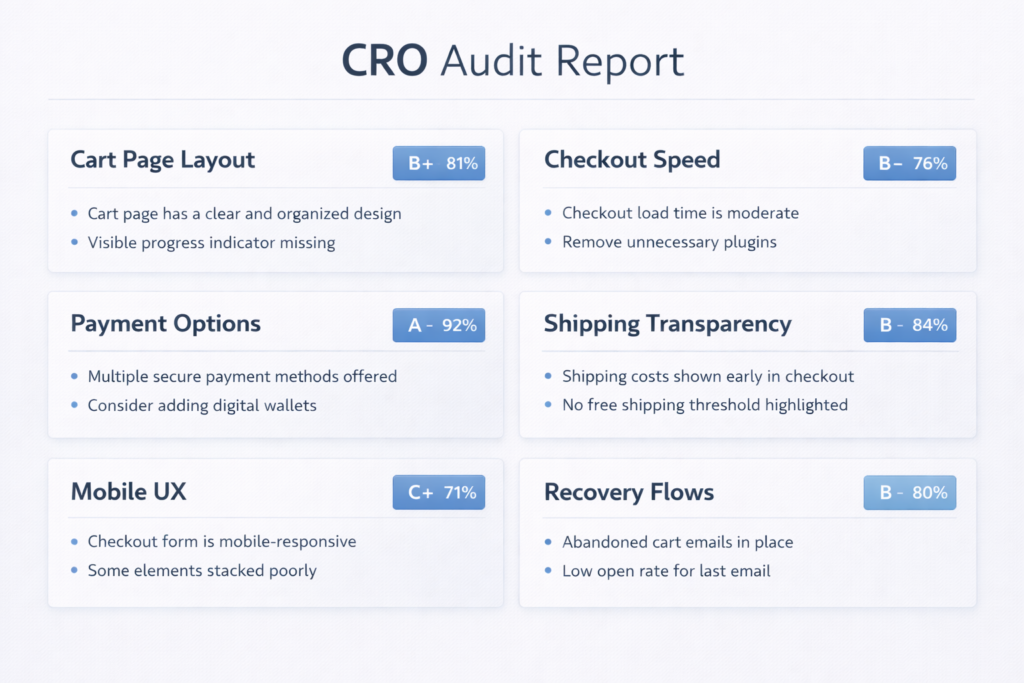
At Site OptimizR, our free WooCommerce audit reviews your cart page layout, checkout flow, mobile UX, page speed, payment options, trust signals, shipping transparency, and recovery path. You get a prioritized action plan built around measurable impact, not guesswork.
Most WooCommerce stores have 3 to 5 preventable friction points costing them sales every day. If you want to turn more add-to-carts into completed orders, we will show you where the abandonment starts and how to stop it.