Free conversion audit
Get a tailored action plan based on your current funnel.
Your Shopify Conversion Rate Is Leaving Money on the Table
You are paying for traffic. People are landing on your Shopify store. But not enough of them are buying. That gap between visitors and customers is where most ecommerce revenue is lost, and it is almost always fixable.
The average Shopify store converts between 1.3% and 1.8% of visitors. Top-performing stores consistently hit 3% to 5%. The difference is not better products or bigger budgets. It is fewer friction points, clearer messaging, faster pages, and smarter checkout flows.
This guide covers the 12 highest-impact ways to increase your Shopify conversion rate in 2026. Every fix is prioritized by ROI so you tackle the changes that move revenue first, not the ones that feel productive but do not show up in your numbers.
What Is a Good Shopify Conversion Rate?
Your Shopify conversion rate is the percentage of store visitors who complete a purchase. The formula is simple: (Orders ÷ Sessions) × 100. If 5,000 people visit your store and 75 buy, your conversion rate is 1.5%.
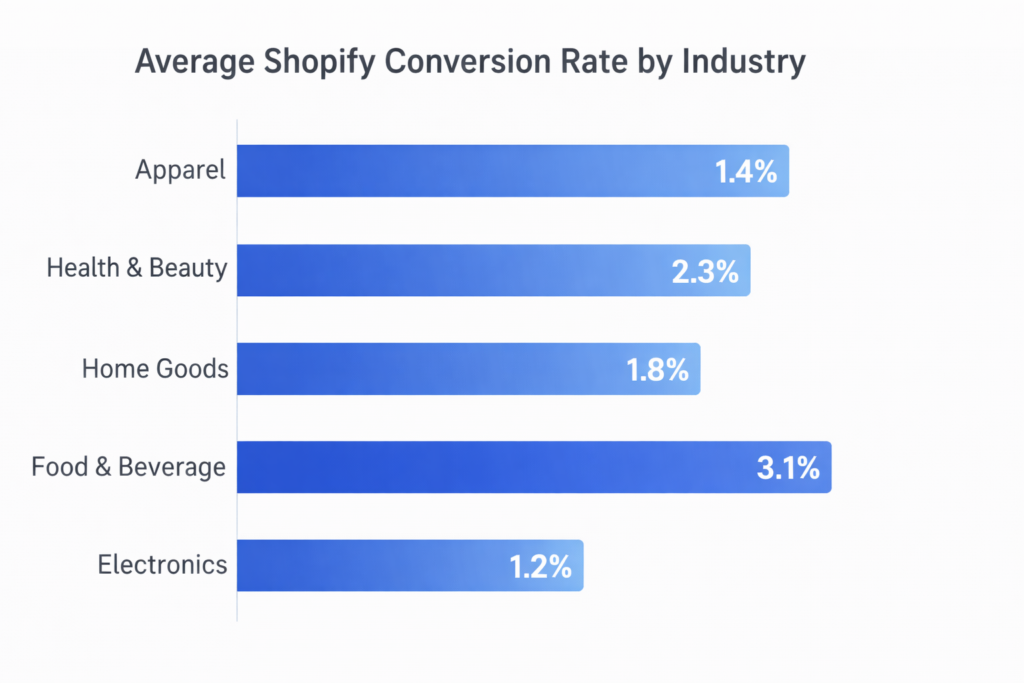
Industry benchmarks vary. Health and beauty stores tend to convert higher than electronics. Subscription products convert differently than one-time purchases. Repeat customer traffic converts at 2x to 5x the rate of cold traffic. That is why blanket comparisons are misleading.
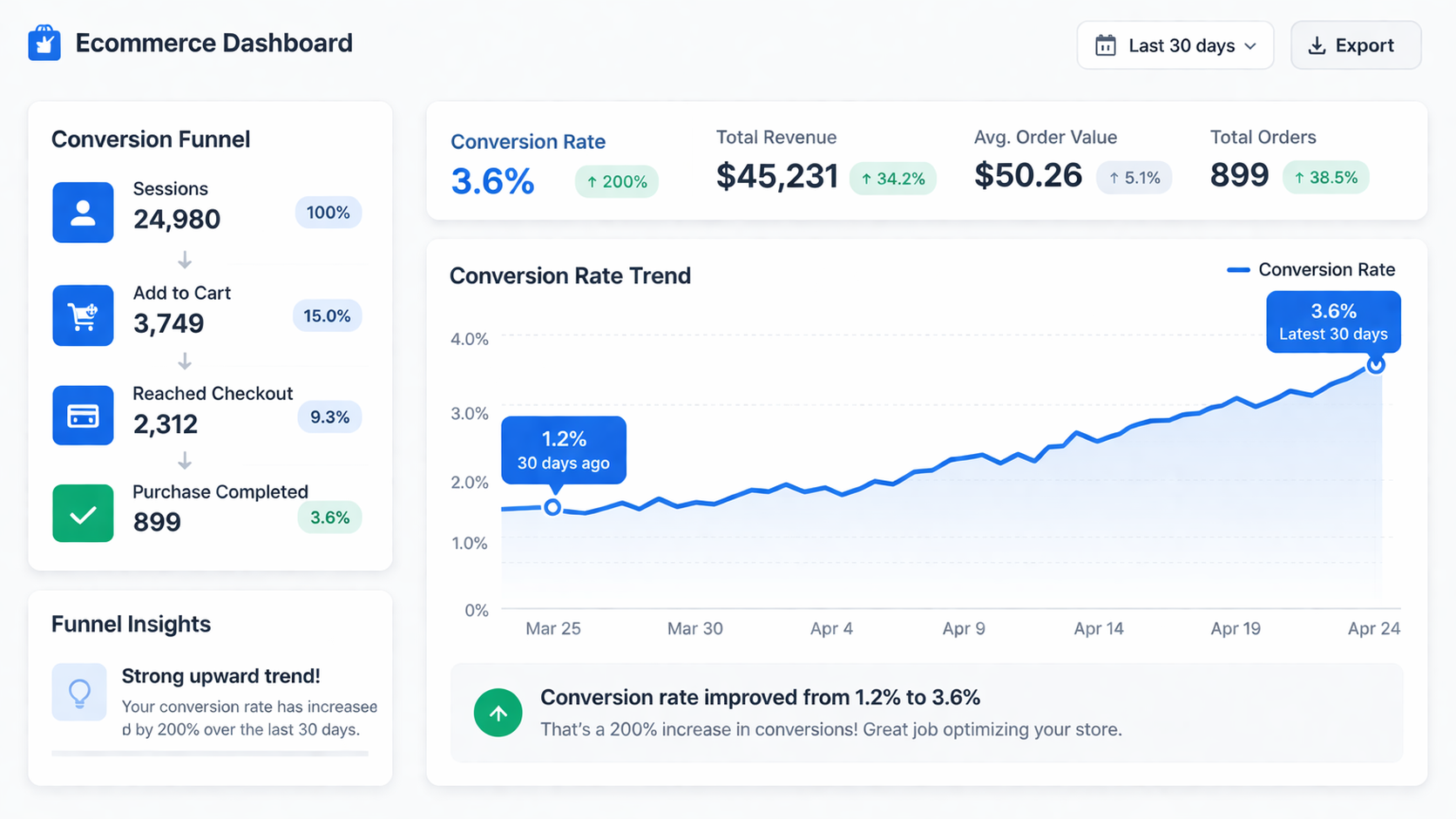
What matters more than the benchmark is direction. If your store converted at 1.2% last quarter and you can push it to 1.8%, that is a 50% increase in revenue from the same traffic. Double your conversion rate and you double your sales without touching your ad spend. The goal is improvement from your own baseline, not matching someone else’s number.
Why Your Shopify Store Is Not Converting
Low conversion rates on Shopify almost never come from one catastrophic problem. They come from a stack of small friction points that compound. Each one costs a few percentage points. Together, they have a compounding effect that bleeds sales every day.
The most common conversion killers on Shopify stores:
- Slow page load — every second of delay drops conversion measurably
- Weak product pages — unclear value, poor images, missing social proof
- Friction in checkout — surprise costs, forced accounts, too many fields
- Poor mobile experience — tiny buttons, buried CTAs, clunky navigation
- No trust signals — missing reviews, unclear return policy, no contact info
- Mismatched traffic — ads promise one thing, landing page delivers another
The fix is not a redesign. It is a systematic audit that identifies which friction points are active in your store right now, then removes them in order of impact. That process is the core of conversion rate optimization.
Fix #1: Fix Your Product Pages First
The product page is where buying decisions happen on Shopify. If it does not convert, nothing downstream matters. A perfect checkout cannot save a product page that fails to build confidence.
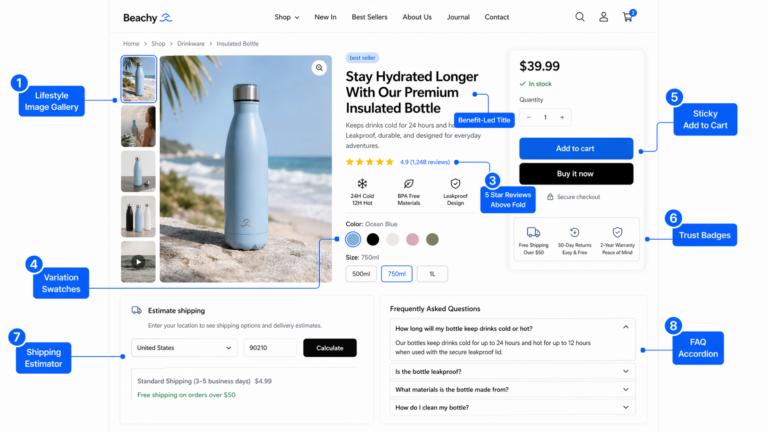
A high-converting Shopify product page includes these elements working together:
- High-quality images — multiple angles, lifestyle shots, zoom functionality, and video when possible
- Clear pricing — visible price, compare-at pricing for sales, and no ambiguity about what the customer pays
- Benefit-led description — lead with outcomes, not features. Tell shoppers what the product does for them before listing specifications
- Visible reviews — star rating and review count above the fold. Full reviews accessible without hunting
- Obvious CTA — a high-contrast Add to Cart button that is immediately visible without scrolling
- Trust indicators — shipping policy, return window, payment badges, and contact availability near the buying action
- Urgency or scarcity if genuine — low stock notices, limited-time pricing, or shipping cutoff times when they are real
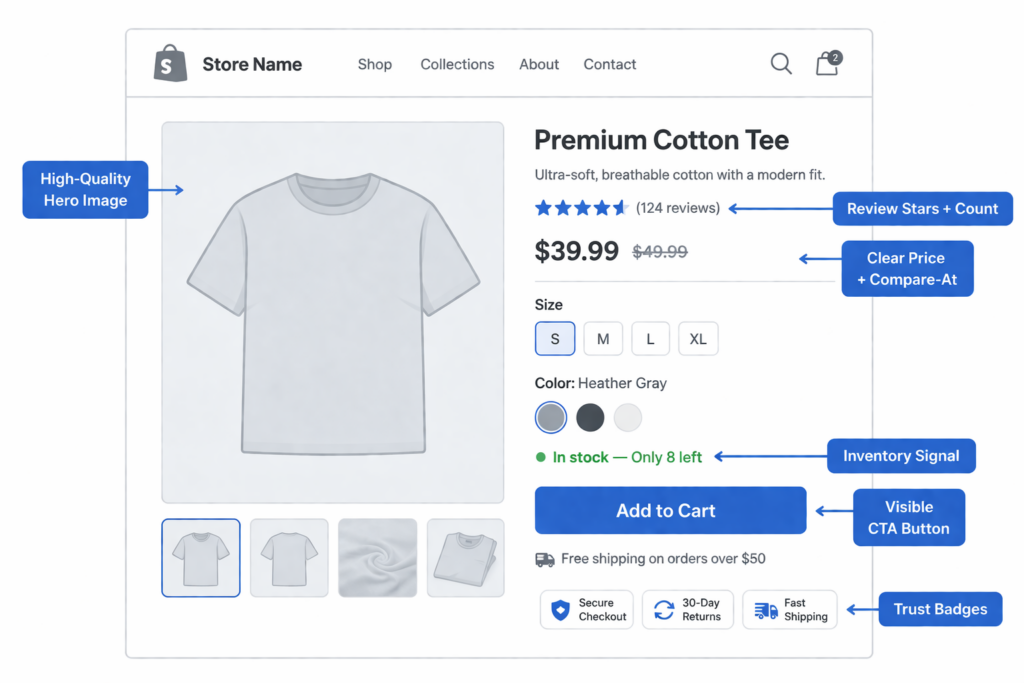
Review your top 10 product pages by traffic. If any of these elements are missing or poorly executed, that is your first fix. These pages already have visitors. They just need fewer reasons to leave.
Fix #2: Speed Is a Conversion Factor, Not a Technical Detail
Page speed directly impacts your Shopify conversion rate. Google has documented that 53% of mobile visitors leave if a page takes longer than 3 seconds to load. On Shopify, the most common speed problems come from unoptimized images, excessive app scripts, heavy theme code, and third-party tracking bloat.
The benchmarks that matter for ecommerce:
- Under 2 seconds — competitive. Minimal speed-related conversion loss
- 2 to 4 seconds — acceptable, but every fraction costs revenue
- Over 4 seconds — you are losing a measurable share of buyers before they even see your product

The fastest wins on Shopify:
- Compress and properly size every product image. Use WebP format where supported
- Audit installed apps — every app adds JavaScript. Remove anything not actively driving revenue
- Defer or lazy-load below-the-fold content, especially on collection and product pages
- Minimize custom code injected through theme settings or third-party snippets
- Test your store speed on a real mobile device, not just Google PageSpeed Insights
Speed optimization is not glamorous, but it is one of the highest-leverage changes you can make. A faster store converts better on every page, every device, and every traffic source. If you need help diagnosing speed issues, our Shopify development team can run a full performance audit.
Fix #3: Make Your Mobile Experience Convert, Not Just Load
Over 70% of Shopify traffic comes from mobile devices, but mobile conversion rates are consistently lower than desktop. The gap is not because mobile shoppers have less intent. It is because most stores are designed on desktop and merely adjusted for mobile.
That adjustment is not enough. Mobile shoppers have less screen space, less patience, and more distractions. A product page that works on a 27-inch monitor often fails on a 6-inch phone.
The mobile fixes that move conversion rate:
- Sticky Add to Cart button — keeps the buying action visible as shoppers scroll through images and description
- Thumb-friendly tap targets — buttons, links, and variant selectors need to be large enough to tap without zooming
- Simplified navigation — fewer menu levels, a visible search bar, and category access in one tap
- Accelerated checkout — Shop Pay, Apple Pay, and Google Pay reduce the effort of completing a mobile purchase to seconds
- Reduced visual clutter — remove pop-ups, slide-ins, and app widgets that overlay buying-critical content on small screens
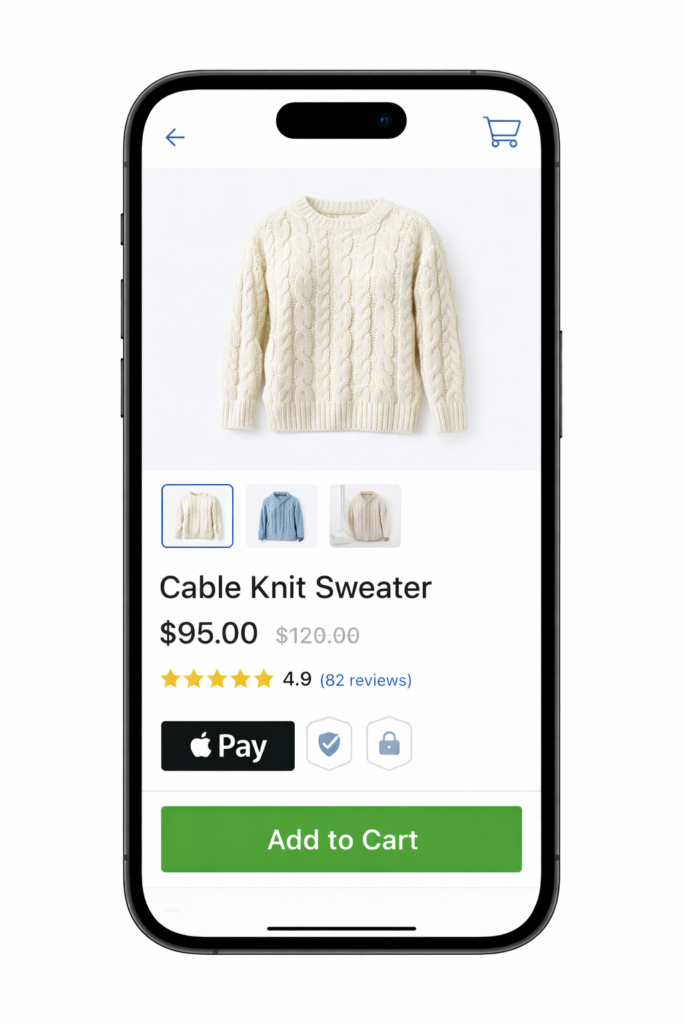
Test everything on a real phone. Use your store as a customer would: browse a collection, tap a product, add to cart, and attempt checkout. The friction you feel is the friction your customers feel every day.
Fix #4: Strengthen Trust at Every Decision Point
Online shoppers make risk calculations constantly. Is this store legitimate? Will the product match the photos? Can I return it if it is wrong? Will my payment information be safe?
Every unanswered question is a reason not to buy. Trust signals answer those questions before the shopper has to ask.
Where trust signals matter most on Shopify:
- Product page — reviews, ratings, return policy summary, shipping timeline
- Cart page — security badges, satisfaction guarantee, clear cost breakdown
- Checkout — payment method icons, SSL indicators, contact information
- Site-wide — professional design, working links, real contact details, visible About page
A trust badge buried in the footer does almost nothing. The same badge placed next to the Add to Cart button or inside the checkout flow can measurably reduce hesitation. Placement matters more than the badge itself.
Fix #5: Reduce Checkout Friction
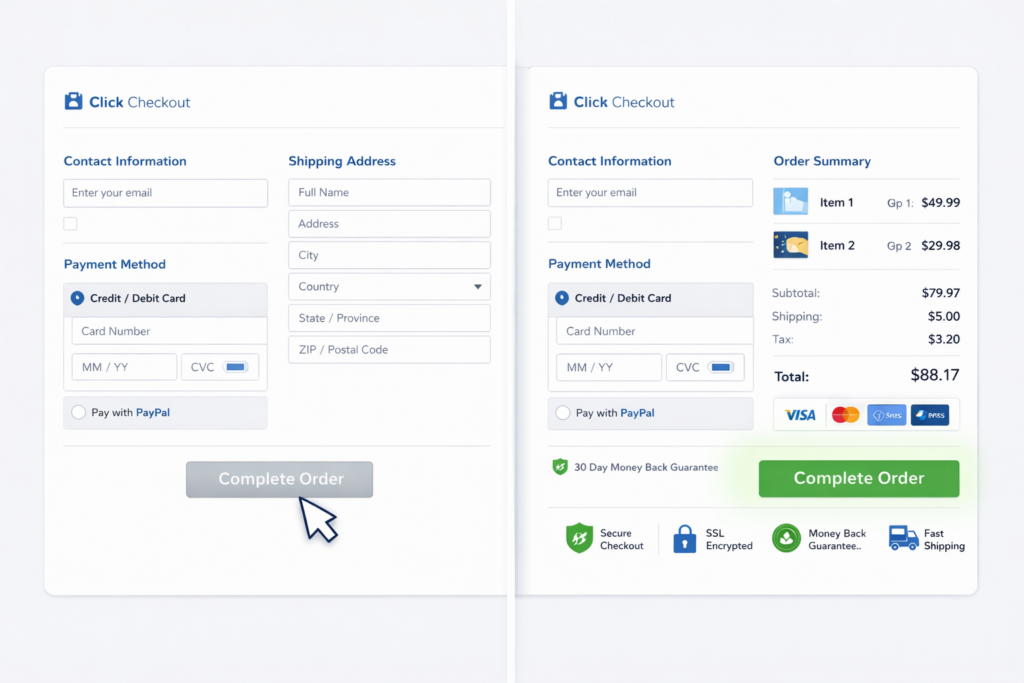
A shopper who reaches checkout has already made the decision to buy. Your job at this point is to not get in the way. Every added step, unexpected cost, or confusing field increases the chance they walk away.
If your cart abandonment rate is high, the checkout is usually where the final leak happens. The highest-impact fixes:
- Enable guest checkout as the default path
- Remove non-essential form fields
- Show shipping cost and delivery estimate before the final step
- Keep accelerated payment options visible and prominent
- Minimize discount code field visibility to avoid coupon-hunting behavior
The goal of checkout optimization is completion, not engagement. Everything that does not help the order get placed is a candidate for removal.
Fix #6: Write Copy That Sells, Not Copy That Describes
Most Shopify product descriptions read like spec sheets. Dimensions, materials, weight, color options. That information is necessary, but it is not what makes someone buy.
People buy outcomes. They buy how the product makes them feel, what problem it solves, or what status it signals. The description should lead with that, then support it with details.
Compare these two approaches:
Before: “100% organic cotton t-shirt. Available in 6 colors. Machine washable. 180 GSM fabric weight.”
After: “The shirt you reach for every morning. Soft enough to sleep in, structured enough to wear out. 100% organic cotton, 180 GSM weight, machine washable. Available in 6 colors.”
Same product. Same facts. But the second version connects with why someone wants it. On high-traffic product pages, rewriting even a few lines of copy can shift conversion rate.
Fix #7: Use Social Proof Strategically
Reviews, testimonials, user photos, and purchase counts are some of the strongest conversion drivers in ecommerce. But most Shopify stores either hide them or present them poorly.
Social proof works best when it appears where decisions happen:
- Star rating and review count visible above the fold on product pages
- Customer photos in the review section to show real-world product use
- Specific testimonials on landing pages and collection pages, not just on individual products
- Best-seller or “most popular” labels on collection pages to guide new visitors toward proven products
If you have reviews, display them prominently. If you do not have reviews yet, prioritize collecting them through post-purchase email flows. A product page with zero reviews converts significantly worse than one with even 5 to 10 honest reviews.
Fix #8: Match Your Landing Pages to Your Ads
One of the most common reasons a Shopify store gets traffic but does not convert is message mismatch. The ad promises one thing. The landing page delivers something else. The shopper bounces.
If your paid ads promote a specific product, deal, or benefit, the page they land on must immediately reinforce that exact message. If the ad says “30% off summer collection” and the landing page is your generic homepage with no mention of the sale, you are paying for clicks that have no chance of converting.
The fixes:
- Create dedicated landing pages or collections for major ad campaigns
- Mirror the ad headline, offer, and imagery on the landing page
- Put the promoted product or deal above the fold with a clear CTA
- Remove distracting navigation options that lead shoppers away from the intended action
Message match is free to fix. It does not require new tools or technology. It just requires making sure what you promise in the ad is what the visitor finds when they arrive.
Fix #9: Simplify Navigation and Reduce Choice Overload
Shoppers who cannot find what they want leave. Shoppers overwhelmed by too many options also leave. Both are navigation problems.
On Shopify, the most common navigation issues are overstuffed mega menus, unclear category names, missing search functionality, and collection pages that dump hundreds of products without filtering options.
Fixes that improve conversion through better navigation:
- Limit main navigation to 5 to 7 top-level items
- Use category names your customers use, not internal product terminology
- Add predictive search with product images and prices in the results
- Enable collection page filters for size, color, price, and product type
- Feature best-sellers or “staff picks” on collection pages to guide undecided shoppers
Every click a shopper has to make to find the right product is a chance to lose them. Reduce the path from landing to product page to cart to as few steps as possible.
Fix #10: Implement Smart Upsells and Cross-Sells
Upsells and cross-sells do not just increase average order value. When done well, they also improve conversion rate by helping shoppers find the right product or bundle faster.
The distinction matters: aggressive upsells that interrupt the buying flow hurt conversion. Relevant product suggestions that appear at the right moment help it.
Where smart recommendations work on Shopify:
- Product page — “Frequently bought together” or “Customers also viewed” sections below the main product
- Cart page — a single complementary product suggestion, not a wall of add-ons
- Post-purchase — offer a relevant add-on after the order is placed, removing any risk of cart abandonment
Keep it simple. One or two relevant suggestions outperform a dozen irrelevant ones. The goal is to increase the value of the order, not to overwhelm the shopper into leaving.
Fix #11: Set Up Proper Analytics Before You Optimize
You cannot improve your Shopify conversion rate if you do not know where shoppers are dropping off. Before running any test or making any change, make sure your analytics are set up correctly.
The minimum analytics setup for Shopify CRO:
- GA4 with enhanced ecommerce tracking — view the full funnel from session to purchase
- Shopify Analytics — use the built-in conversion funnel report to identify top-line drop-off
- Session recording tool — Microsoft Clarity is free and shows you exactly where shoppers hesitate, rage-click, or abandon
- Heatmaps — see where shoppers actually click versus where you expect them to click
- Device and source segmentation — know whether mobile, desktop, organic, paid, or social traffic converts differently
Data-driven optimization beats opinion-driven changes every time. A 30-minute analytics review often reveals the single biggest conversion leak faster than weeks of guessing.
Fix #12: A/B Test Changes That Actually Matter
A/B testing is how you turn assumptions into evidence. But most stores either skip testing entirely or test the wrong things. Testing button colors while your checkout hides shipping costs is not optimization.
Test the variables that directly affect buying decisions:
- Product page headline and description copy
- CTA button text and placement
- Price presentation and compare-at framing
- Trust signal placement near the Add to Cart button
- Mobile layout and sticky CTA behavior
- Free shipping threshold messaging
Run one test at a time with enough traffic to reach statistical significance. A winning test on a high-traffic product page can permanently lift your conversion rate. Over time, compounding small wins produces dramatic improvement.
The Compounding Effect of Shopify CRO
No single fix doubles your conversion rate overnight. But each improvement compounds. A faster site converts slightly better. Better product pages convert slightly better. Stronger trust signals convert slightly better. Cleaner checkout converts slightly better.
Stack five improvements that each lift conversion by 10% to 15%, and the combined effect is transformative. A store converting at 1.2% can reach 2.5% or higher without redesigning anything — just by removing the friction that was always there.
This is why conversion rate optimization has the highest ROI in ecommerce marketing. You are not paying for new traffic. You are extracting more revenue from every visitor you already earned.

Get a Free Shopify Conversion Rate Audit
If your Shopify store gets traffic but the sales do not match, the problem is almost certainly visible in the data. You do not need a full rebuild. You need to know exactly where buyers are dropping off and which fixes will move your numbers fastest.
At Site OptimizR, our free Shopify audit reviews your product pages, site speed, mobile UX, checkout flow, trust signals, and analytics setup. You get a prioritized action plan based on what is actually costing you sales — not generic advice.
Most Shopify stores have 3 to 5 fixable friction points that are quietly bleeding revenue every day. If you want to increase your conversion rate without increasing your ad spend, we will show you where to start.