Free conversion audit
Get a tailored action plan based on your current funnel.
Shopify email marketing automation is one of the fastest ways to grow revenue without buying more traffic. Paid ads get people to the store once. Email automation keeps working after they leave: recovering abandoned carts, converting first-time buyers into second purchases, reminding customers to reorder, and bringing lapsed buyers back before they forget you exist.
The problem is that most Shopify stores treat email like a newsletter tool. They send campaigns when there is a sale, but their lifecycle flows are thin, generic, or missing entirely. That leaves money sitting in predictable gaps: visitors who browsed but never added to cart, shoppers who started checkout but disappeared, customers who bought once and never got a reason to come back.
This guide gives you the nine Shopify email flows every growth-stage store should build first, the timing for each one, the segmentation rules that matter, and the metrics to watch so you know whether each flow is actually improving revenue.
Why Shopify Email Marketing Automation Matters
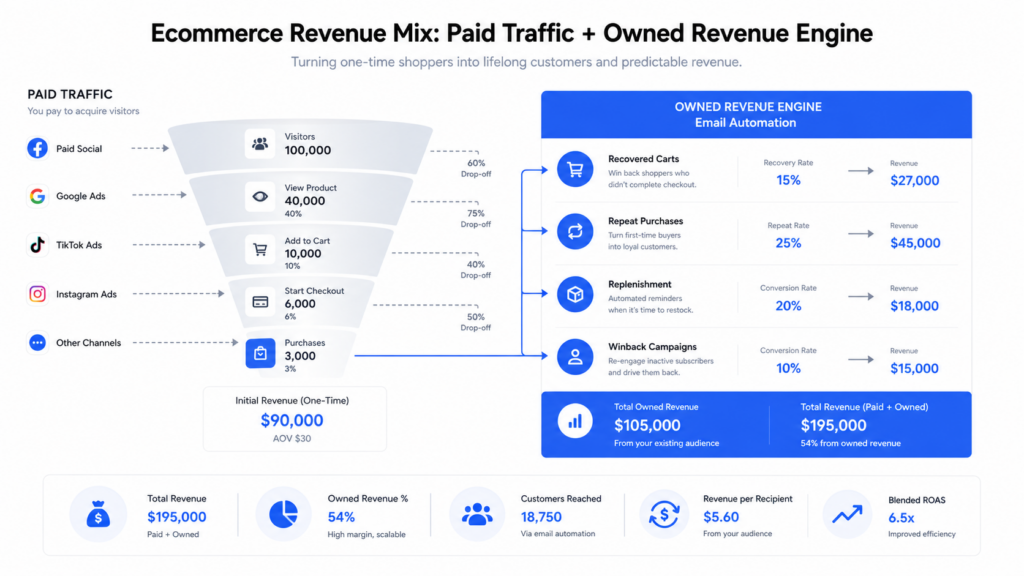
Email automation matters because it turns one-time traffic into an owned revenue system. A mature ecommerce email program often drives 20 to 35 percent of total store revenue when lifecycle flows and campaigns are both working. If your email account is driving less than 15 percent, the issue is usually not list size. It is missing automation.
Shopify stores are especially vulnerable to this leak because acquisition costs move faster than most merchants can react. If Meta CPMs jump 20 percent or Google Shopping conversion rate dips for a week, your profit margin gets squeezed immediately. A strong email marketing system cushions that volatility by getting more revenue from the visitors and buyers you already paid to acquire.
Think of every automation as a recovery mechanism. Browse abandonment recovers attention. Cart abandonment recovers purchase intent. Post-purchase education recovers customer confidence. Replenishment recovers repeat demand. Winback recovers dormant buyers. None of those flows create demand from scratch. They capture demand that already exists, and that is revenue your store already earned the right to capture.
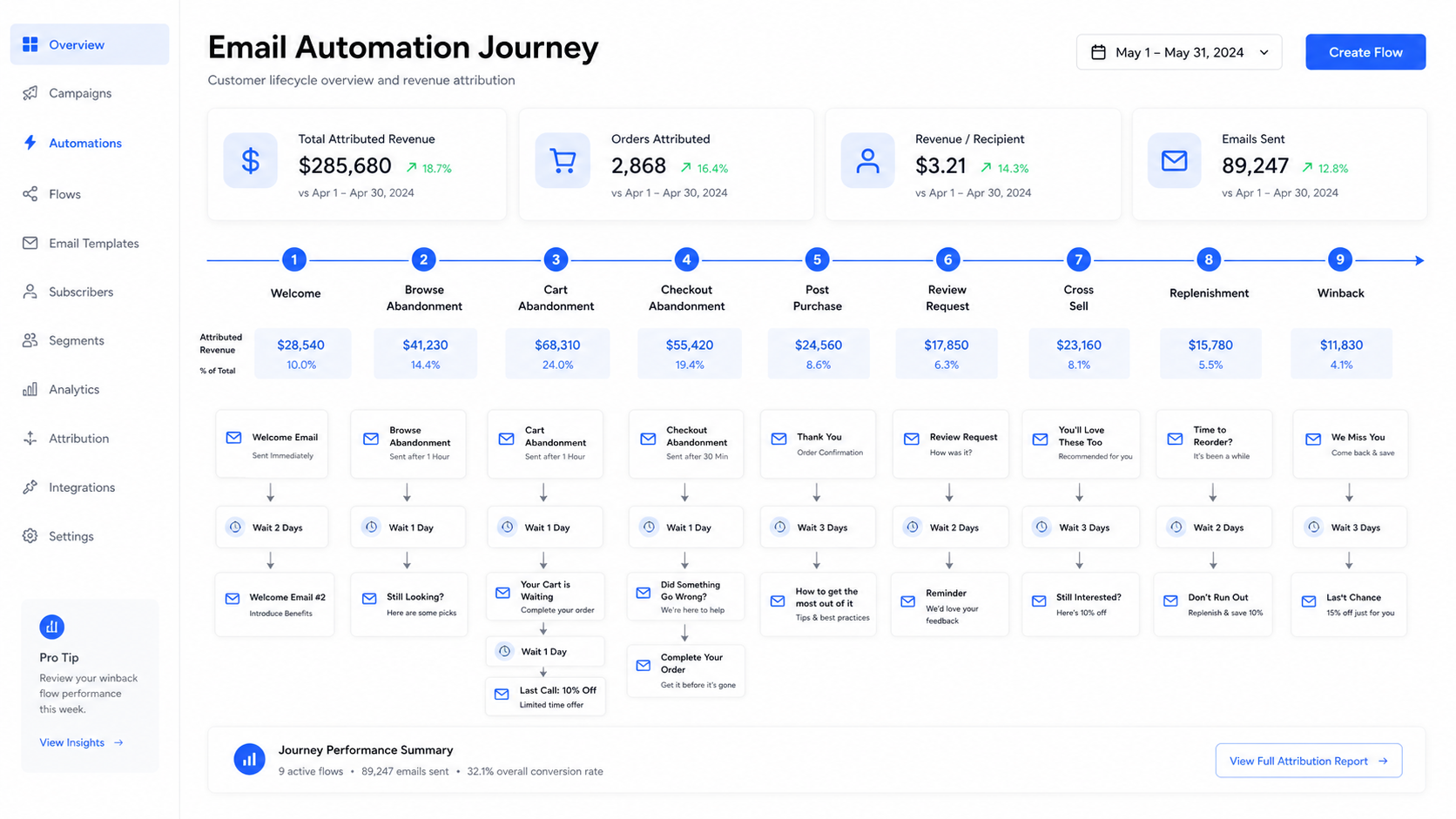
The 9 Shopify Email Flows You Need
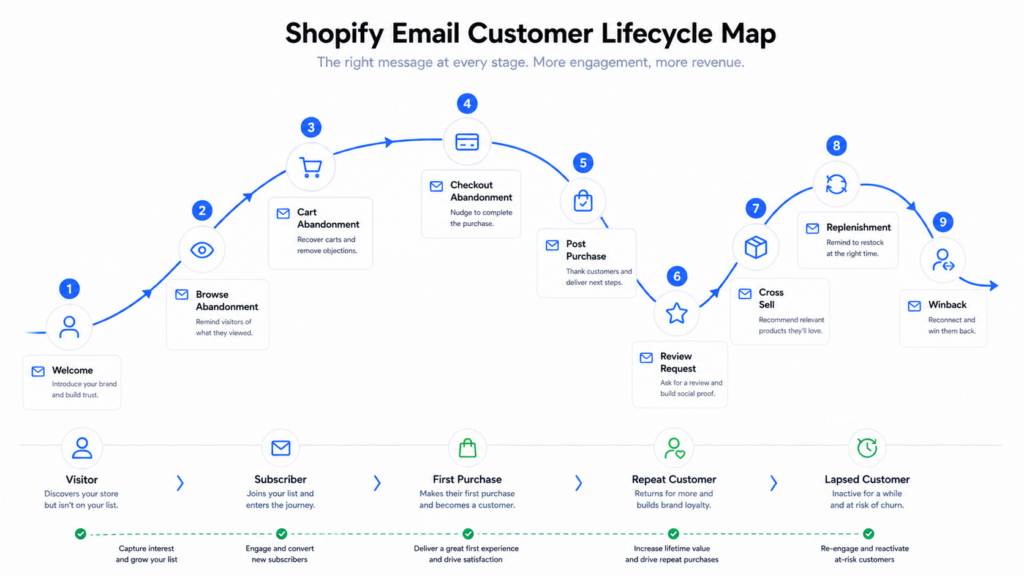
The best Shopify email flows match the customer lifecycle. You do not need 40 automations to start. You need the nine flows that cover the highest-intent moments from first opt-in to repeat purchase.
- Welcome flow: Converts new subscribers into first-time buyers.
- Browse abandonment flow: Brings product viewers back before they forget the item.
- Add-to-cart abandonment flow: Recovers shoppers who showed clear buying intent.
- Checkout abandonment flow: Targets the highest-intent drop-off before purchase.
- Post-purchase education flow: Reduces buyer’s remorse and support tickets.
- Review request flow: Turns satisfied customers into conversion assets.
- Cross-sell flow: Recommends the next logical product after the first purchase.
- Replenishment flow: Reminds customers to reorder consumables or repeat-use products.
- Winback flow: Reactivates customers who have not purchased in a defined window.
If you use Klaviyo, Omnisend, Shopify Email, Sendlane, or Attentive, the tool matters less than the structure. The real lift comes from matching message, timing, and offer to customer intent. A three-email abandoned cart flow with product context will beat a beautiful one-email flow with no segmentation almost every time.
Welcome Email Flow for Shopify Subscribers
A welcome flow is the first automation a new subscriber receives after joining your list. Its job is not to introduce your whole brand story. Its job is to convert the subscriber while intent is fresh.
Start with three to five emails over seven days. Email one should deliver the promised incentive immediately: discount code, quiz result, guide, early access, or whatever the popup promised. Email two should explain why the product is different. Email three should show proof: reviews, before-and-after results, press, founder credibility, or user-generated content. Email four can handle objections. Email five can create urgency if the welcome offer expires.
- Email 1: Send immediately with the incentive and best-selling collection link.
- Email 2: Send after 24 hours with product differentiation and proof.
- Email 3: Send after 48 hours with reviews or UGC.
- Email 4: Send after 4 days with FAQs, shipping, returns, and trust signals.
- Email 5: Send after 6 or 7 days with final offer reminder.
Measure placed order rate, revenue per recipient, and discount usage. If the welcome flow gets a high open rate but weak revenue, your first email is probably too brand-heavy and not clear enough about what to buy next.
Browse Abandonment Email Flow
Browse abandonment targets visitors who viewed a product but did not add it to cart. It is lower intent than cart abandonment, so the tone should be helpful rather than aggressive.
The best trigger is Viewed Product with filters that exclude recent purchasers, active cart abandoners, and anyone who has received too many emails in the past few days. Send the first email two to four hours after the product view. If there is no click, send a second email 24 hours later with social proof or education around that product category.
Do not lead with a discount here. A browser has not earned one yet. Lead with a reminder, a benefit, or a helpful comparison. Save offers for cart, checkout, or winback flows where intent and friction are clearer.
Abandoned Cart and Checkout Email Automation
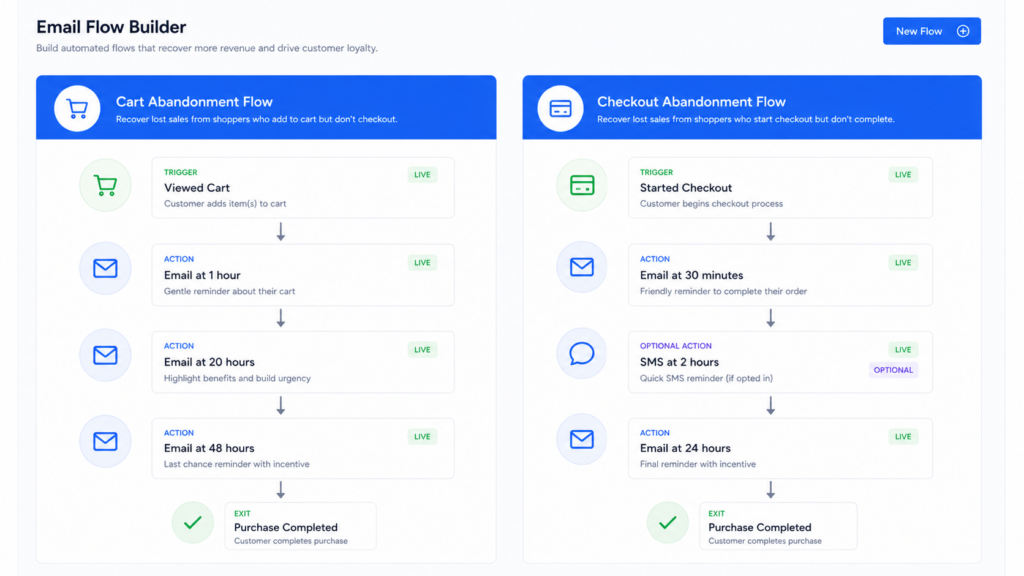
Abandoned cart and checkout flows are related, but they should not be identical. Cart abandonment means the customer added a product to cart and left. Checkout abandonment means they started checkout and left. Checkout abandonment is higher intent, so it deserves faster timing and a more direct recovery message.
For cart abandonment, start with a three-email structure. Send email one after one hour, email two after 20 to 24 hours, and email three after 48 hours. Email one should be a clean reminder with product image and cart link. Email two should answer objections: shipping time, return policy, sizing, guarantees, customer reviews. Email three can introduce a small incentive if your margin allows it.
For checkout abandonment, move faster. Send the first message 30 to 60 minutes after checkout starts. This customer was close enough to enter checkout, so friction may be payment concerns, shipping cost, discount code hunting, or trust. This is where Shopify checkout optimization and email automation overlap. If checkout has confusing shipping, a visible discount field, or weak trust signals, email can recover some revenue but it cannot fix the root problem.
Track cart recovery rate, checkout recovery rate, revenue per recipient, spam complaints, and revenue by flow, not just total email revenue.
Post Purchase Email Flow
A post-purchase flow starts after a customer buys. Its job is to make the customer feel confident, reduce support load, and prepare the second purchase. This is one of the most underused ecommerce email automations because merchants assume the order confirmation email is enough.
It is not. The Shopify order confirmation tells the customer that payment worked. A real post-purchase flow tells them what happens next, how to get the most from the product, and what to buy when they are ready.
- Day 0: Thank the customer and reinforce the decision they just made.
- Day 2: Explain shipping expectations and product care or usage basics.
- Day 7: Send tips, setup instructions, recipes, styling ideas, or usage education.
- Day 14: Ask for a review if delivery has occurred.
- Day 21: Recommend the next logical product based on what they bought.
- Day 30+: Trigger replenishment if the product has a predictable usage window.
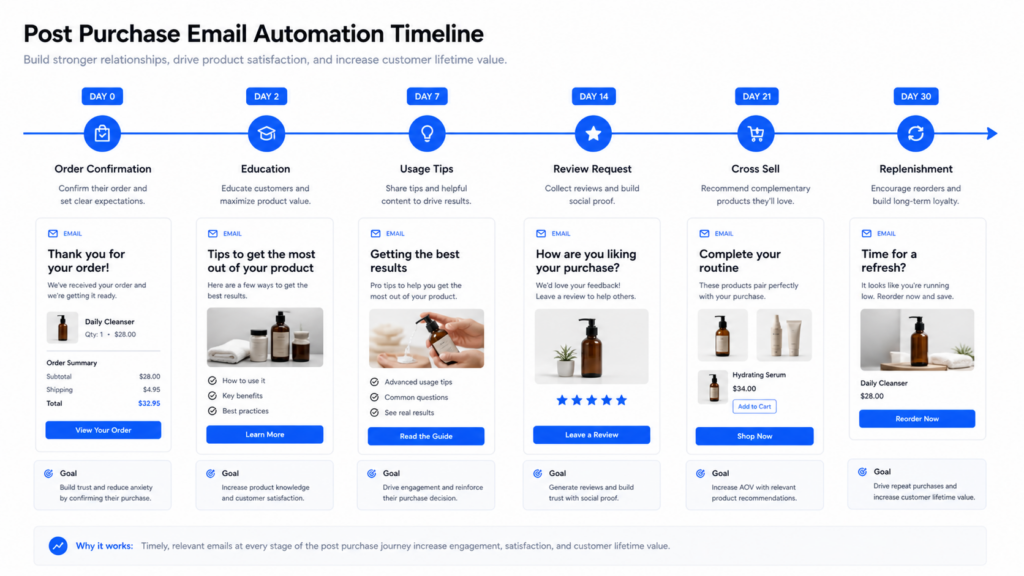
For a skincare brand, this might mean application tips, expected results by week, routine pairing, and refill timing. For a kitchen product, it might mean recipes, cleaning instructions, accessory recommendations, and warranty registration. The more complex the product, the more valuable this flow becomes.
Review Request Email Flow
Review request emails turn happy customers into proof for future buyers. This is not just a retention play. It is conversion rate optimization, because better reviews improve product page trust and help undecided visitors buy.
Timing depends on the product. For fast-delivered apparel, 10 to 14 days after fulfillment may be enough. For supplements, skincare, home goods, or products where results take time, wait 21 to 45 days. If you ask before the customer has used the product, you get fewer reviews and lower-quality answers.
Keep the email short. Ask one clear question, show the product purchased, and make the review action easy. If you use Loox, Judge.me, Yotpo, Okendo, or Stamped, use the direct in-email review form when available. Every extra click reduces completion rate.
Cross-Sell and Upsell Email Flow
A cross-sell flow recommends the next best product after a customer buys. The mistake is recommending random best sellers. The correct approach is to build product logic around what the customer already purchased.
Examples:
- A customer buys running shoes, then gets socks, insoles, or recovery tools.
- A customer buys a coffee machine, then gets filters, beans, descaler, or accessories.
- A customer buys a skincare cleanser, then gets moisturizer, serum, or SPF.
- A customer buys a dress, then gets matching jewelry, shapewear, or shoes.
This flow works best after the customer has had enough time to receive and use the first product. For most stores, 14 to 30 days is a better window than 48 hours. Too soon feels like another sales pitch before the first product has even landed.
Replenishment Email Automation
Replenishment emails remind customers to reorder before they run out. This is essential for consumables: supplements, skincare, coffee, pet food, cleaning products, filters, razors, vitamins, cosmetics, pantry items, and anything used on a predictable cycle.
The key is timing. If a 30-day product gets a replenishment email on day 35, the customer may already have bought elsewhere. If it goes on day 10, it feels irrelevant. Start with the expected usage window minus shipping time minus two to three days. For a 30-day supply with five-day shipping, send the reminder around day 22 or 23.
This flow should usually have two messages: a helpful reminder and a final reorder nudge. If the customer buys, remove them from the flow and restart the clock from the new order date. If you sell subscriptions, send them to the subscription option rather than a one-time reorder when margin and product fit make sense.
Winback Email Campaign for Lapsed Shopify Customers
A winback flow targets customers who have not purchased within a defined period. The right window depends on the normal buying cycle. A coffee customer might be lapsed after 60 days. A furniture customer might not be lapsed for 180 days. A fashion customer could be lapsed after 90 days if new drops happen monthly.
Use three messages. The first should be personal and product-led: new arrivals, improved formulas, seasonal picks, or what changed since they last bought. The second should introduce social proof or a best-seller update. The third can use an incentive if the customer is still inactive.
Segment winbacks by customer value. A one-time $24 buyer should not receive the same offer as a three-time $400 buyer. High-LTV customers deserve stronger recovery offers, early access, or a personal concierge-style message. Low-LTV customers should receive a lighter automated offer so you do not train low-margin buyers to wait for discounts.
Klaviyo Shopify Automation Metrics to Watch
Do not judge email flows only by open rate. Apple Mail Privacy Protection made open rate less reliable, and a beautiful open rate can hide weak conversion. Judge each flow by revenue and behavior.
- Revenue per recipient: The clearest metric for comparing flow impact.
- Placed order rate: Shows whether the flow actually drives buying behavior.
- Click rate: More reliable than open rate for intent.
- Unsubscribe rate: Reveals whether timing or frequency is too aggressive.
- Spam complaint rate: A warning sign that the list or message is misaligned.
- Flow revenue share: Shows whether email automation is carrying enough owned revenue.
For most Shopify stores, abandoned cart and checkout flows should be the top revenue drivers. Welcome should be close behind if list capture is strong. Post-purchase, replenishment, and winback usually compound over time as purchase volume grows.
Common Shopify Email Automation Mistakes
The most common mistake is building flows once and never tuning them. Customer behavior changes as your offer, pricing, product catalog, and paid ads traffic change. A flow that worked when you had three SKUs may be weak after you expand to 40.
- Sending every subscriber the same path: Segment by product, source, purchase count, and engagement.
- Discounting too early: Do not train browsers to wait for coupons.
- Ignoring mobile: Most email clicks happen on mobile, so product pages and checkout must match the promise.
- Using generic copy: Flow emails should reflect the exact product, objection, and customer stage.
- Measuring total email revenue only: Break performance down by flow, segment, and cohort.
Email also cannot fix a broken store experience. If product pages lack proof, if checkout adds surprise shipping, or if mobile speed is weak, your automations will recover less revenue than they should. Pair email work with Shopify product page optimization and checkout testing for the biggest lift.
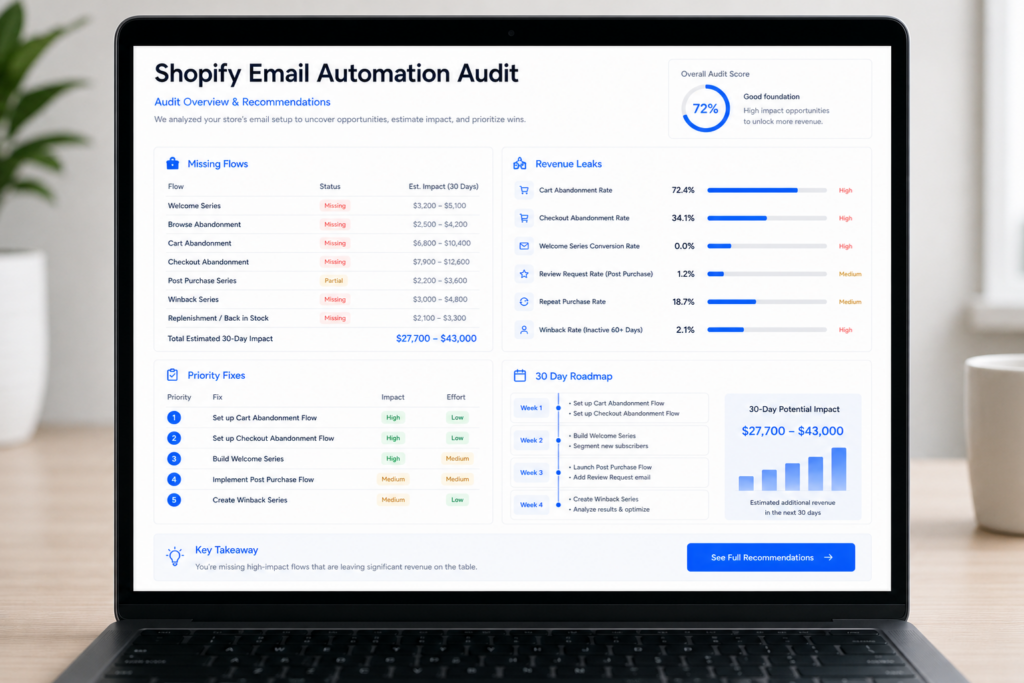
Get a Shopify Email Automation Audit
If your Shopify email flows are missing, underperforming, or built from default templates, you are leaving recoverable revenue on the table. Site OptimizR can audit your current email setup, identify the highest-value missing flows, and map a 30-day plan for improving owned revenue without increasing ad spend.
We look at your welcome flow, abandoned cart, checkout abandonment, post-purchase experience, review request timing, cross-sell logic, replenishment windows, winback segmentation, popup strategy, and how email performance connects to your store’s broader conversion funnel.
Get a free Shopify email automation audit and we will show you where the biggest revenue leaks are hiding.
Place lifecycle email inside a wider acquisition mix with our ecommerce traffic resilience guide.